Breaking
Patch Tuesday November 2026: Microsoft fixes over 1,000 flaws and an Outlook bug used in attacks
- Microsoft's November 2026 security updates fix 1,094 of its own flaws across Windows, Office, SQL Server and more.
- One Outlook flaw, CVE-2026-124194, was already used in attacks. Opening a booby-trapped file could leak a scrambled form of your Windows login.
- Microsoft rates that bug only Moderate, but it is the one to fix first. Install the Windows update and make sure Office is up to date.
- 1,094Microsoft flaws fixed in NovemberMicrosoft's own count
- 1Flaw used in attacks before the fixOutlook, CVE-2026-124194
- 726Of the fixes are for WindowsThe biggest share by far
- 6.5Severity score of the Outlook bugOut of 10; rated Moderate
An email arrives with a file that looks routine. You open it in Outlook, nothing seems to happen, and you move on. For some people this month, that single click may have handed an attacker a scrambled copy of their Windows login.
That is the flaw at the centre of Patch Tuesday November 2026. On 10 November, Microsoft released fixes for 1,094 of its own security flaws across Windows, Office, SQL Server and more. One of them, an Outlook bug numbered CVE-2026-124194, was already being used in attacks before the fix existed.
One Outlook flaw among 1,094 fixes
Microsoft’s own release note lists 1,094 Microsoft flaws, with Windows taking 726 of them and Office 174. It also marks one entry “Exploitation Detected”: the Outlook spoofing flaw.
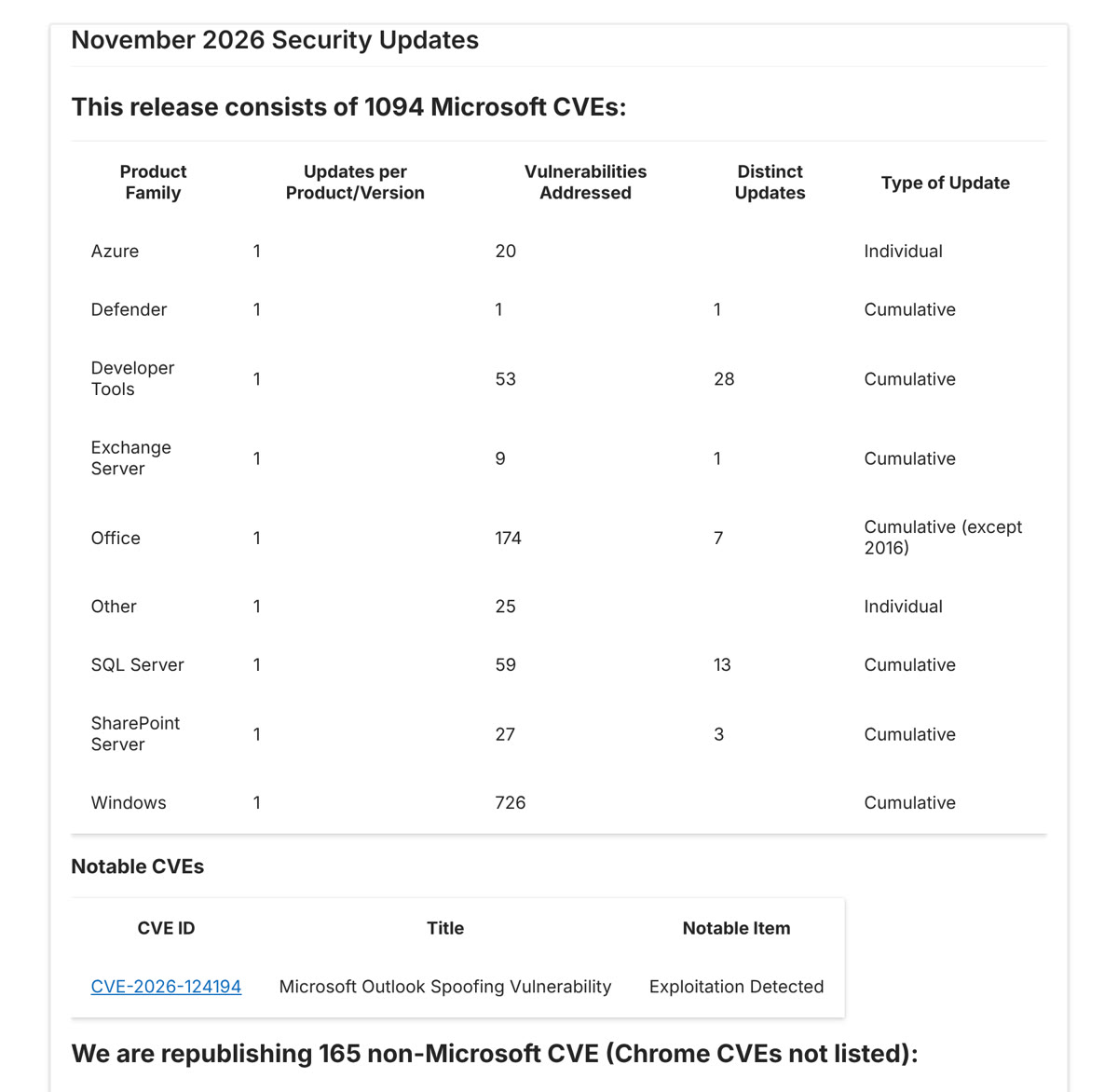 Microsoft’s release note for the November 2026 security updates, listing 1,094 fixes by product and the Outlook flaw under attack, from the Security Update Guide. Image: Microsoft
You may see a bigger number elsewhere. BleepingComputer counts 1,235 flaws, because it adds 142 fixes for the Edge browser and leaves out 108 that were fixed earlier in the month. Both counts describe the same, very large release. BleepingComputer also reports dozens of critical flaws, most of which could let an attacker run their own code on a computer.
Microsoft's own products only; Edge and other non-Microsoft fixes are not included. Source: Microsoft Security Update Guide: November 2026 Security Updates
Why a “Moderate” bug is the one to fix first
Here is the twist. Microsoft rates the Outlook zero-day only “Moderate”, with a severity score of 6.5 out of 10. Yet it is the only flaw this month that Microsoft says attackers have already used.
According to Microsoft’s advisory, an attacker sends a specially made message or Office file and persuades you to open it in Outlook. Outlook can then connect to the attacker’s server without showing its usual warning about outside content. That connection can leak your NTLM hash, a scrambled form of your Windows login, which the attacker could use to pose as you. BleepingComputer notes that similar flaws have been used in phishing campaigns to steal these hashes.
There are limits. You have to open the file yourself; Microsoft says simply previewing it in the Preview Pane is not a way in. The advisory lists Microsoft 365 Apps for Enterprise, Office LTSC 2024 and Office LTSC 2021. Microsoft has not said who used the flaw, or against whom.
How to install the Patch Tuesday November 2026 updates
For most people, the fix takes a few minutes and one restart. These steps come from Microsoft’s own update pages.
- Windows 11: go to Settings, then Windows Update, then Check for updates. Install and restart. Versions 24H2, 25H2 and 26H2 get KB5132061; version 23H2 gets KB5131087.
- Windows 10: KB5131096 reaches only PCs enrolled in extended security updates. Without them, there is no fix, which is a good reason to plan an upgrade.
- Outlook and Office: Office usually updates itself. To be sure, open any Office app, choose File, then Account, then Update Options, then Update Now.
- Until you update: don’t open unexpected attachments, even when they seem to come from people you know.
If you look after computers at a small business, update Office on every machine first. One leaked work login can open many doors.
Why the size matters less than the speed
There is real good here. Microsoft found and fixed a very large number of problems in one go, flagged the attacked flaw clearly, and told people exactly which update to install. Our recent stories on PHP and Node.js fixes and an OpenSSH password flaw show the same pattern: the fix matters only once it is installed.
The harder part is the label. A “Moderate” rating may lead busy IT teams to treat the Outlook bug as routine, even though it is the one attackers already know. And releases of more than a thousand fixes put real strain on the people who must test and roll them out.
On balance, this is a month to update promptly rather than worry. The attack needs a click, and the fix is already waiting.
What to watch before December’s updates
Watch for any reports of problems with KB5132061, and for Microsoft naming the group behind the Outlook attacks. The next Patch Tuesday falls on 8 December 2026.
Prefer to watch? Follow us on YouTube
The tech stories that matter, explained in plain words. Subscribe so you never miss one.
Quick answers
When was Patch Tuesday in November 2026?
On Tuesday 10 November 2026. Patch Tuesday is the second Tuesday of each month, so the next one is 8 December 2026.
What is the Outlook zero-day vulnerability?
CVE-2026-124194 is an Outlook spoofing flaw. If you open a specially made file, Outlook can connect to an attacker's server without its usual warning and leak a scrambled form of your Windows login. Microsoft says it was used in attacks before the fix.
What is KB5132061?
It is the November 2026 security update for Windows 11 versions 24H2, 25H2 and 26H2. Windows 11 23H2 gets KB5131087, and Windows 10 PCs in extended security updates get KB5131096.
How many flaws did Microsoft fix in November 2026?
Microsoft lists 1,094 of its own flaws. BleepingComputer counts 1,235 because it adds 142 Microsoft Edge fixes and leaves out 108 fixed earlier in the month.
Words to know
- Patch Tuesday
- The second Tuesday of each month, when Microsoft releases its security fixes.
- Zero-day
- A flaw that attackers used before a fix existed.
- CVE
- A public ID number given to each known security flaw.
- NTLM hash
- A scrambled form of a Windows login that attackers can steal and sometimes reuse or crack.
- Spoofing
- Tricking a system or person into trusting something fake.
- CVSS
- A score from 0 to 10 for how severe a security flaw is.
Sources (8): every key fact checked against at least two
- Microsoft Security Update Guide: November 2026 Security Updates (release note, 10 November 2026)
- Microsoft Security Update Guide: CVE-2026-124194, Microsoft Outlook Spoofing Vulnerability
- Microsoft Support: KB5132061, Windows 11 24H2, 25H2 and 26H2 security update (10 November 2026)
- Microsoft Support: KB5131087, Windows 11 23H2 security update (10 November 2026)
- Microsoft Support: KB5131096, Windows 10 21H2 and 22H2 security update (10 November 2026)
- Microsoft Learn: Microsoft 365 Apps security updates release notes
- BleepingComputer: Microsoft November 2026 Patch Tuesday fixes 1,235 flaws, Outlook zero-day (10 November 2026)
- BleepingComputer: Windows 11 KB5132061 and KB5131087 cumulative updates released (10 November 2026)
Related stories
Apple TV adds sign language interpreters you can switch on, starting with Being Heumann on 13 November
Apple TV sign language interpretation starts 13 November with Being Heumann. How to turn it on or off, which films have it, and what is still unclear.
Iris Ohyama data breach: details of up to 7.7 million Iris Plaza shoppers may have leaked
The Iris Ohyama data breach: details of about 7.7 million Iris Plaza shoppers may have leaked. What was taken, what wasn't, and what to do now.
Windows 11 tests a way to switch off the Sticky Keys pop-up for good, from the pop-up itself
How to turn off Sticky Keys today, and the Windows 11 test option that stops the Shift-key pop-up for good. What changes, and why there is no date yet.