Googlebook's first big update brings 31 fixes, from Zoom crashes to reboot loops
- Google is rolling out the first big Googlebook update, with 31 fixes listed for its five launch laptops.
- It fixes Zoom crashes, Netflix black screens on monitors, Bluetooth lag, random restarts and a reboot loop.
- Install it from Settings when it reaches you. Google has not said how often updates will come.
- 31Fixes and changes in the update30 listed items plus security patches
- 5Googlebook models coveredAcer, ASUS, Dell, HP and Lenovo
- 9Changes listed for the Dell XPS modelHP Googlebook 14 gets 8
- 5 Nov 2026Update announced by GoogleAbout six weeks after launch
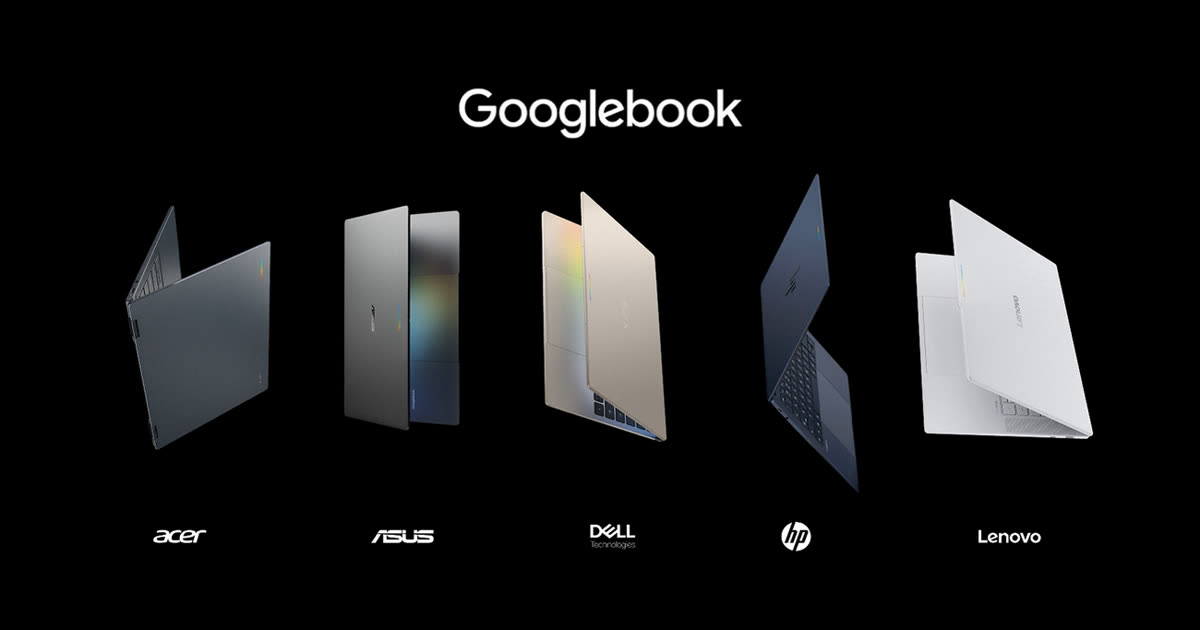
You open the lid, type your PIN, and the first few letters simply vanish. Later, your Zoom call crashes the moment you blur the messy room behind you. For some of the first people to buy a Googlebook, small moments like these have been part of the deal.
Google is now rolling out the first big Googlebook update, the “Googlebook November update”. Its notes list 31 fixes and changes for the five launch laptops, from Zoom crashes to a reboot loop.
The timing matters. Googlebook is Google’s new line of premium laptops, introduced on 21 September 2026 with models from Acer, ASUS, Dell, HP and Lenovo, starting at US$899. A first update this size, about six weeks in, says a lot about where the platform stands.
Zoom, lock screens and monitors top the fix list
Google’s post, shared in the Googlebook Help Community on 5 November, says the update brings “many bug fixes, stability improvements and firmware updates”. 9to5Google and Chrome Unboxed both count 31 items: 30 listed changes plus a line on the latest security patches.
Count of items in each section of Google's post. Security patches are one more line, for 31 in all. Source: Google: November Googlebook Updates (Googlebook Help Community, 5 November 2026)
Some fixes reach every model. Key presses now register when you type a PIN or password right after waking the laptop. Zoom should be more stable with background blur, virtual backgrounds, filters or 3D avatars. Bluetooth mice reconnect after a restart. USB microphones such as the Focusrite Scarlett and Elgato Wave can record again where they failed before. Browser memory is steadier with many tabs open. And Google fixed a problem that could trap a laptop in a reboot loop if an update was interrupted.
The HP Googlebook 14 and Dell XPS Googlebook 13 get the most attention: eight and nine changes of their own, by 9to5Google’s count. Netflix and other protected videos no longer go black on an external monitor. Unplugging a USB-C hub no longer crashes the display driver. Videos with Bluetooth earbuds should no longer fall out of lip-sync. A firmware fault that caused random restarts is fixed.
One change stands out for accessibility. On the HP and Dell models, Bluetooth hearing aids can now be chosen for sound, instead of audio playing through the laptop speakers.
The memory fix comes without a number
On the 16GB Acer, ASUS and Lenovo models, Google says it “improved memory usage for on-device AI”, which helps when you run many apps at once. On-device AI means AI features that run on the laptop itself.
Google gives no figure for how much memory this frees. Android Authority reports the change frees 3GB to 6GB of RAM, and The Gadgeteer repeats that range. Google’s own post does not include it, so treat it as their reporting, not a confirmed number.
Getting the Googlebook update, and who should hurry
Like any Googlebook OS update, it arrives as a notification, according to Google’s help pages. If you missed it, open Settings, then System, Software updates, System update. Google suggests connecting to Wi-Fi and charging to at least 75% before you start. Google says the update is rolling out, so if you don’t see it yet, check again later.
If you have struggled with Zoom crashes, a black Netflix screen on a second monitor, Bluetooth audio lag or random restarts, this is the update to look for. Google’s post covers only the five Googlebook models; it says nothing about Chromebooks.
If you are comparing Googlebook vs Chromebook models, or reading Googlebook reviews before buying, this is useful context. The early problems were real, and many are now fixed.
Quick fixes are welcome, but the list says something too
On balance, this is a good sign. Google published a clear, detailed list of what changed, model by model, instead of a vague “bug fixes” line. Owners can check whether their own problem is on it.
The other side is harder to ignore. A reboot loop, PIN keys that don’t register, and video calls that crash are not small edge cases on a premium laptop. The likelier reading is that Googlebook launched before some of its everyday basics were fully ready, and early buyers did part of the testing. Google has not explained why these problems shipped.
Two questions remain open. Google has not said whether updates will now come every month. And its post lists what was fixed, not which known problems are still waiting for a fix.
What to watch next
Watch for a December update, and whether Google sets a regular schedule. A new laptop line earns trust less by its launch day than by how quickly it fixes what went wrong. On that test, this is a solid first step.
Prefer to watch? Follow us on YouTube
The tech stories that matter, explained in plain words. Subscribe so you never miss one.
Quick answers
How do I get the Googlebook November update?
Google says you get a notification when an update is ready. You can also open Settings, then System, Software updates, System update. Connect to Wi-Fi and charge to at least 75% first.
Which Googlebook laptops get the update?
All five launch models: Acer Googlebook 14, ASUS Googlebook 14, Dell XPS Googlebook 13, HP Googlebook 14 and Lenovo Googlebook 15.
Does the update free up RAM?
Google says it improves memory use for on-device AI on 16GB Acer, ASUS and Lenovo models, but gives no number. Android Authority reports 3GB to 6GB freed; Google has not confirmed that.
Is this update for Chromebooks too?
Google's November post covers only the five Googlebook models. It says nothing about Chromebooks.
Words to know
- On-device AI
- AI features that run on the laptop itself, not on a company's servers.
- RAM (memory)
- The laptop's short-term working space for open apps and tabs.
- Firmware
- Low-level software that tells the hardware how to start and run.
- DRM
- Copy protection that streaming services such as Netflix use on their videos.
Sources (7): every key fact checked against at least two
- Google: November Googlebook Updates (Googlebook Help Community, 5 November 2026)
- Google Googlebook Help: Check & update your Googlebook's operating system
- Google: Premium materials and striking design set Googlebook apart (John Maletis, 21 September 2026)
- 9to5Google: Googlebook November update rolling out with 31 fixes, improvements (Abner Li, 5 November 2026)
- Chrome Unboxed: A big new Googlebook OS update is here (Robby Payne, 6 November 2026)
- The Gadgeteer: Googlebook's first update frees up to 6GB of RAM and fixes the Zoom crash (9 November 2026)
- Android Authority: Googlebook November update
Related stories
Apple says more than 100,000 apps are now built for the iPhone Duo, two weeks after launch
Apple says over 100,000 iPhone Duo apps are now built for its folding screen. Which apps are ready, why some show a black bar, and what to check.
Motorola Signature 27 is the first phone beyond Pixel to support GrapheneOS, at US$1,599
The Motorola Signature 27 is the first non-Pixel phone to support GrapheneOS. US price, release date, key specs and the questions still open.
Apple's first touchscreen Mac is an OLED MacBook Pro, and it starts at US$2,899
The MacBook Pro OLED brings touch to the Mac for the first time. Price, release date, what's new and who should pay US$2,899 over the M6 model.